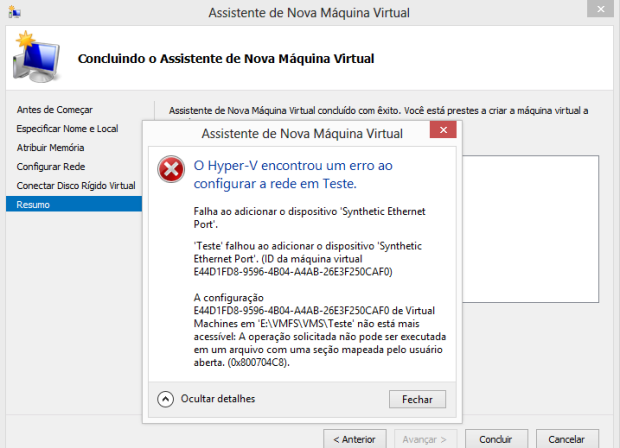
Ao criar uma maquina virtual utilzando Hyper-v do Windows Server 2012 me deparei com o seguinte erro:
Deste momento lembrei de uma frase de um grande amigo Samuel Ribeiro “O Obvio nos induz ao erro”
Solução:
Solution:
Desable AV/Software
Ao criar uma maquina virtual utilzando Hyper-v do Windows Server 2012 me deparei com o seguinte erro:
Deste momento lembrei de uma frase de um grande amigo Samuel Ribeiro “O Obvio nos induz ao erro”
Solução:
Solution:
Desable AV/Software
This probleman occurs in the client
version of Netextender 5.5, simply enter mysonicwall.com and install version 6.0.181
Resolution
Close Microsoft Outlook
Access
C:Userscharles.santanaAppDataLocalMicrosoftOutlook
Rename
Offline Address Books.old
Open Microsoft Outlook,.
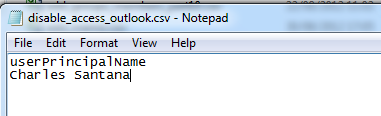
Import-CSV “E:scriptsdisable_access_outlook.csv” | foreach {Set-CASMailbox -identity $_.userPrincipalName -MAPIEnable $True}
.Csv file
Set-CASMailbox –identity “[email protected]” –MAPIEnable $False (Disable Access
Set-CASMailbox –identity “[email protected]” –MAPIEnable $True (Enable Access)
Import-CSV “E:scriptsreset.csv” | foreach {Set-MsolUserPassword -userPrincipalName $_.userPrincipalName -NewPassword $_.Password -ForceChangePassword $false}
.Csv File
UserPrincipalname,Password
[email protected],P@ssWord
Parameters
-ForceChangePassword
$False = Not change the password netx logon
$True = Change the password netx logon
Set-MsolUserPassword –UserPrincipalName [email protected] –NewPassword “P@ssWord” –ForceChangePassword $false
Set- DistribuitonGroup [email protected] -EmailAddresses SMTP:[email protected]
Set-Mailbox [email protected] –EmailAddresses SMTP:[email protected]
Product: SonicWALL Global VPN Client — Error 27850. Unable to manage networking component. Operating system corruption may be preventing installation.
Applies to any VPN client (Network Adapter)
Solutions:
HKEY_LOCAL_MACHINE\SYSTEM\CurrentControlSet\Control\Network\MaxNumFilters
Change “MaxNumFilters” 14

 Charles Aureliano Santana
Você precisa fazer login para comentar.